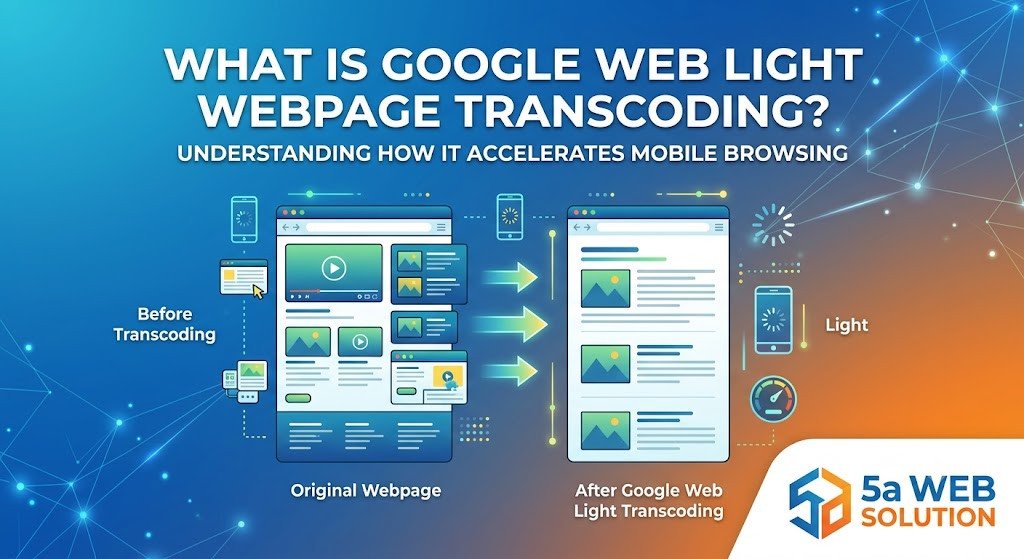
What Is Google Web Light Webpage Transcoding?
The internet has become an essential part of everyday life, but not everyone enjoys fast and reliable internet connectivity. In many regions, users still rely on slow mobile networks or limited data plans. Loading modern websites packed with high resolution images, videos, animations, and heavy scripts can be frustrating under these conditions. To improve the browsing experience for users on slower connections, Google introduced Google Web Light Webpage Transcoding.
Google Web Light is a technology designed to optimize web pages before they reach the user's device. It reduces the size of a webpage by compressing images, removing unnecessary elements, and simplifying the page structure. As a result, websites load faster while consuming significantly less mobile data.
In this blog, we will explore what Google Web Light Webpage Transcoding is, how it works, its benefits, limitations, and why website owners should understand its impact.
What Is Google Web Light Webpage Transcoding?
Google Web Light Webpage Transcoding is a service developed by Google to improve webpage loading speeds on slow internet connections. Instead of serving the original webpage directly, Google processes the page on its own servers and creates a lighter version that is delivered to the user's browser.
The primary goal of this technology is to make web browsing faster, especially on 2G and slower mobile networks. By reducing the amount of data required to load a webpage, users can access information more quickly while saving on mobile data usage.
Google Web Light is automatically enabled when Google detects that a user is browsing with a slow internet connection. Website owners do not need to manually activate it, and users typically do not have to configure any settings.
What Does Webpage Transcoding Mean?
Webpage transcoding refers to the process of modifying a webpage before it is displayed to the user. During this process, the webpage is optimized to reduce its overall size and improve loading performance.
The transcoding process may include:
Compressing large images
Removing unnecessary JavaScript
Simplifying HTML and CSS
Eliminating heavy page elements
Reducing external resource requests
Optimizing fonts and layouts
The end result is a lightweight version of the webpage that is easier to load on slower internet connections.
How Does Google Web Light Work?
Google Web Light functions as an intermediary between the website and the user. Instead of the user's browser requesting the webpage directly from the website's server, Google first processes the webpage and creates an optimized version.
The process generally follows these steps:
1. User Searches on Google
A user searches for information using Google Search while connected to a slow mobile network.
2. Google Detects Slow Connection
Google identifies that the user's internet speed is below a certain threshold.
3. Google Creates a Lightweight Version
Google retrieves the webpage from the original website and optimizes it by removing unnecessary content and compressing resources.
4. Optimized Page Is Delivered
The user receives a simplified version of the webpage that loads much faster than the original.
This entire process happens automatically and usually takes only a fraction of a second.
Features of Google Web Light
Google Web Light includes several optimization techniques designed to improve webpage performance.
Faster Page Loading
Heavy web pages are reduced in size, allowing them to load quickly even on slower mobile networks.
Reduced Data Usage
Compressed images and simplified code significantly reduce the amount of data required to view a webpage.
Image Optimization
Images are resized and compressed without making them unusable.
Script Reduction
Some JavaScript files that are not essential for displaying content may be removed or simplified.
Mobile Friendly Display
The optimized pages are designed to display properly on mobile devices with limited resources.
Benefits of Google Web Light Webpage Transcoding
Better User Experience
Visitors can access content quickly without waiting for large files to load.
Lower Mobile Data Consumption
Users save mobile data because the webpage contains fewer resources.
Improved Accessibility
People in rural areas or regions with slower internet infrastructure can browse websites more comfortably.
Faster Information Access
News articles, blogs, educational content, and informational pages become easier to access.
Reduced Bounce Rate
When pages load quickly, users are less likely to leave before reading the content.
Does Google Web Light Affect SEO?
One common question among website owners is whether Google Web Light impacts search engine optimization.
The answer is generally no.
Google Web Light is designed to improve user experience rather than alter search rankings. The original webpage remains the version indexed by Google Search. The lightweight version is only served temporarily to users with slow internet connections.
However, website owners should continue following SEO best practices, including:
Creating fast loading websites
Using responsive web design
Optimizing images
Reducing unnecessary scripts
Improving Core Web Vitals
Publishing high quality content
A well optimized website reduces the need for Google Web Light and delivers a better experience for all users.
Limitations of Google Web Light
Although Google Web Light offers many advantages, it also has some limitations.
Interactive Features May Not Work
Some advanced JavaScript functions may not operate as intended after optimization.
Visual Design May Change
The simplified version may not match the original website's appearance exactly.
Advertisements May Be Limited
Certain advertising formats or third party widgets may not display properly.
Dynamic Content Can Be Affected
Complex applications that rely heavily on scripts may experience reduced functionality.
Branding Elements
Large banners, animations, and interactive media may be simplified or removed.
How Can Website Owners Prepare?
Even though Google handles Web Light automatically, website owners should optimize their websites independently.
Here are some recommended practices:
Optimize Images
Use modern image formats such as WebP and compress images before uploading.
Improve Website Speed
Minimize CSS, JavaScript, and HTML files to reduce page size.
Use Responsive Design
Ensure the website works well on all screen sizes.
Enable Browser Caching
Caching allows returning visitors to load pages faster.
Use a Content Delivery Network
A CDN reduces latency by serving content from servers closer to users.
Remove Unnecessary Plugins
Too many plugins can slow down website performance.
Focus on Core Web Vitals
Google recommends improving loading performance, responsiveness, and visual stability for better user experience.
Is Google Web Light Still Relevant?
Over the years, mobile internet speeds have improved significantly with the expansion of 4G and 5G networks. As a result, fewer users require Google Web Light compared to when it was first introduced.
However, many regions around the world still experience slow internet connectivity. For these users, technologies that reduce webpage size remain valuable. More importantly, the principles behind Google Web Light continue to influence modern web development by encouraging faster, cleaner, and more efficient websites.
Website owners should not rely on Google Web Light as a substitute for proper optimization. Instead, they should build websites that load quickly under normal conditions, ensuring an excellent experience for every visitor regardless of network speed.
Best Practices for Modern Websites
If you want your website to perform well with or without Google Web Light, follow these best practices:
Compress all images before publishing.
Use lazy loading for images and videos.
Minimize CSS and JavaScript files.
Reduce unnecessary third party scripts.
Enable GZIP or Brotli compression.
Use responsive layouts for mobile devices.
Monitor Core Web Vitals regularly.
Improve server response time.
Use a reliable hosting provider.
Test your website on slower network speeds.
Conclusion
Google Web Light Webpage Transcoding is an innovative technology designed to help users browse the web more efficiently on slow internet connections. By creating a lightweight version of webpages, Google reduces loading times, minimizes data usage, and improves accessibility for millions of users worldwide.
While the service offers clear benefits for users with limited connectivity, website owners should continue focusing on building fast, responsive, and optimized websites. A well optimized website not only provides a better experience for visitors but also supports stronger SEO performance, improved engagement, and higher user satisfaction.
As internet technology continues to evolve, the core idea behind Google Web Light remains relevant: delivering fast, accessible, and user friendly web experiences for everyone, regardless of their network speed.